Mail Act-On alternative
Missing Mail Act-On? Get your filing keys back.
Mail Act-On stopped working when Apple Mail dropped plug-ins in macOS Sonoma. DuperMail isn't a plug-in. It brings back one-key filing, reply templates and reminders, inside Apple Mail on macOS 26 or later.
Free for 14 days. No plug-in to install.
Act-On rules, as one key each.
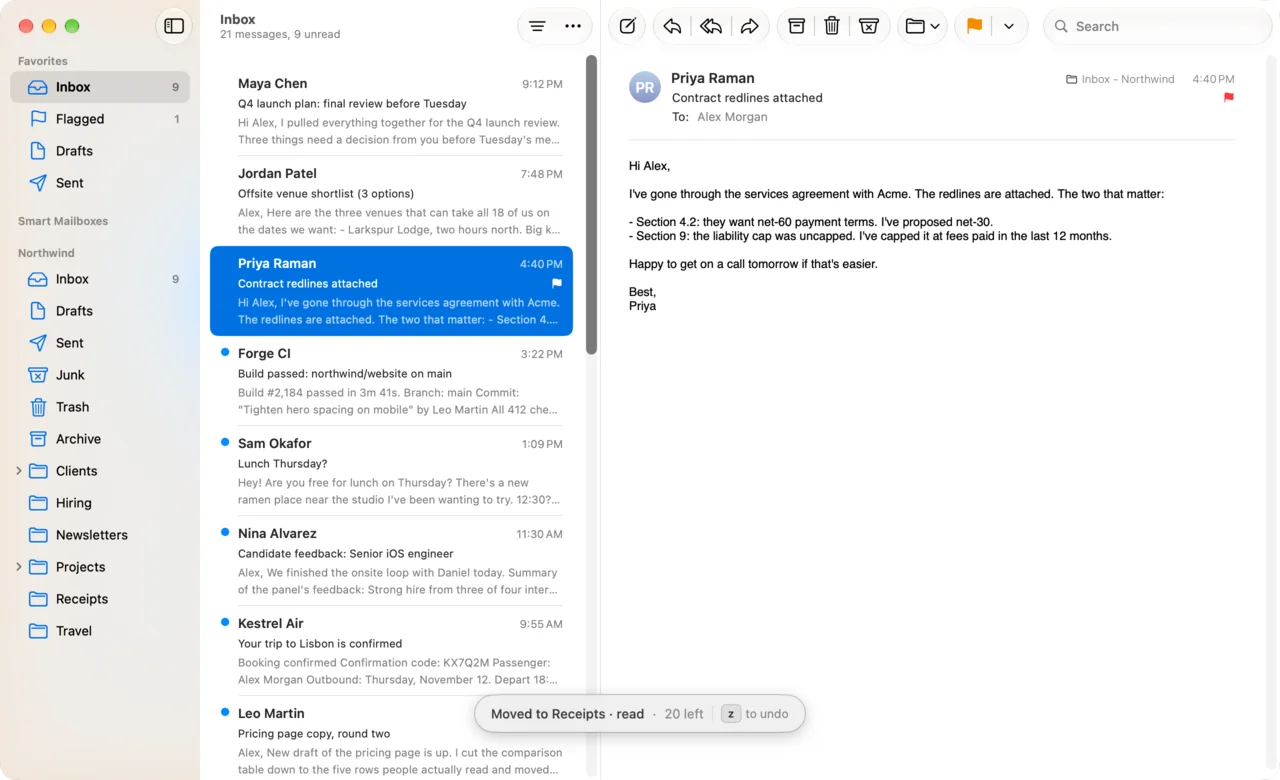
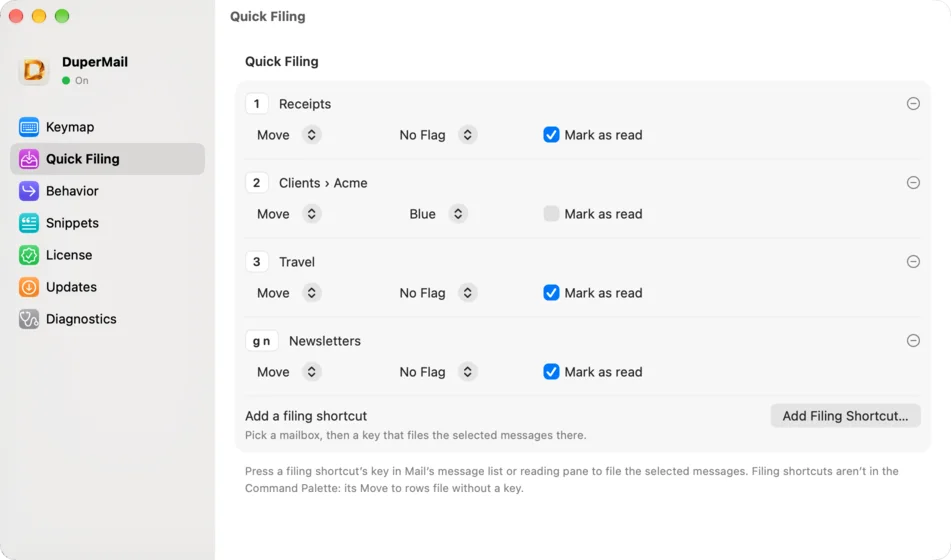
Most Act-On rules did one thing: put this message in that mailbox, maybe mark it read on the way. Quick Filing does exactly that. Pick a mailbox, pick a key, and choose whether to move or copy, flag it and mark it as read.
Any key works, from 1 to a two-key sequence like gn. It files every selected message, says where they went and how many are left, and z undoes the lot.
For everything else, press v and type a few letters of any mailbox on any account.
Reply templates, while you write.
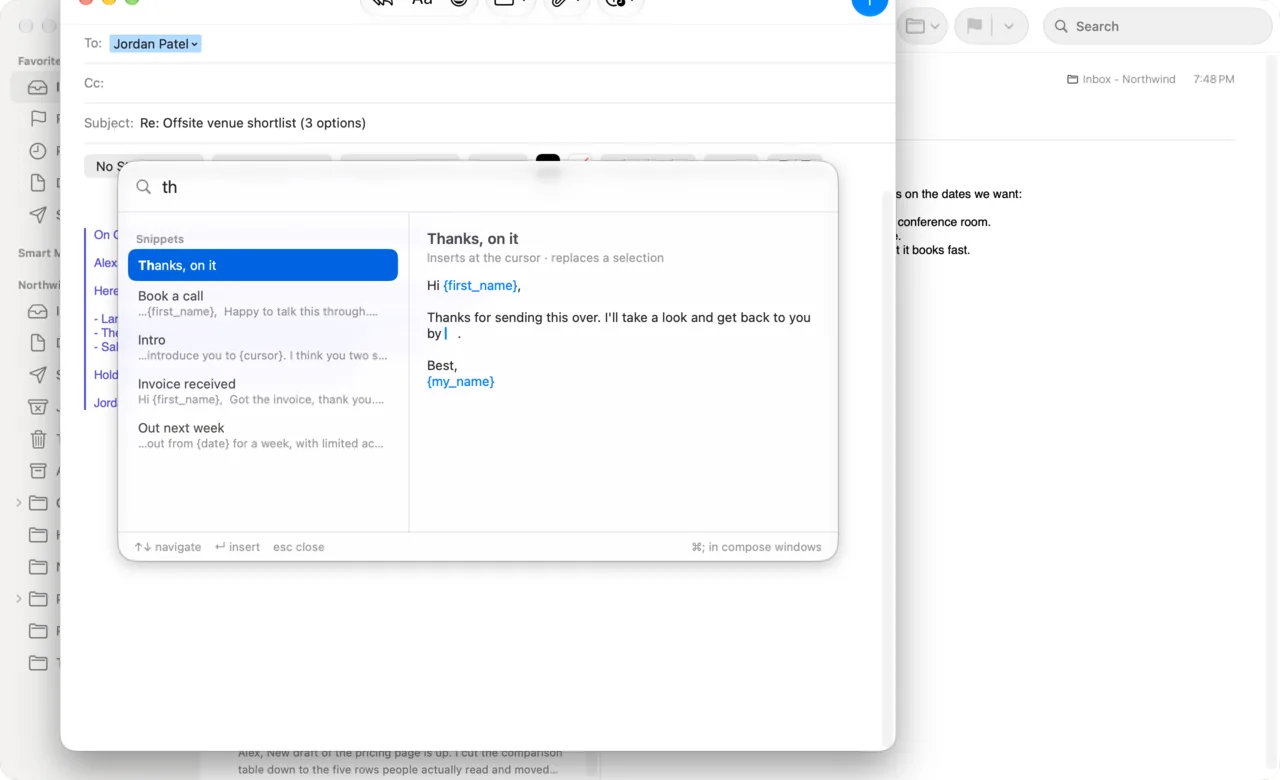
Press ⌘; in any message you're writing and pick a snippet. It fills in the recipient's first name, your name and today's date, puts the cursor where you'll keep typing, and fills in an empty subject. ⌘Z takes it back out.
The Act-On menu, for every command.
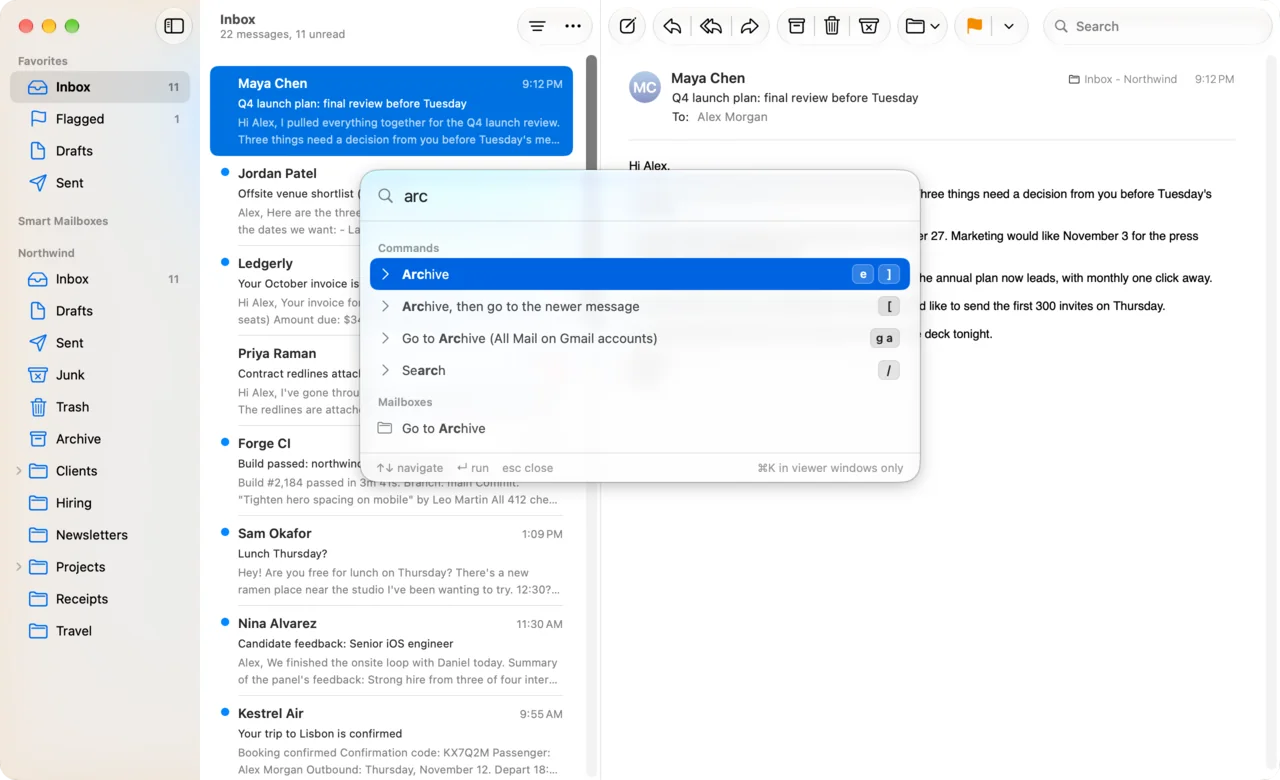
⌘K opens a palette with every DuperMail action and every mailbox. Type a few letters and press Return. It shows each command's key, so the ones you use often become muscle memory.
Where each Mail Act-On feature went
Some of it is in DuperMail, some is now built into Apple Mail, and two things have no replacement yet.
| In Mail Act-On | Now |
|---|---|
| Act-On rules: file a message with a keystroke | Quick Filing. Give a mailbox its own key; one press moves or copies the selection there, and can flag it and mark it as read too. |
| File to any mailbox from the keyboard | Press v to move or l to copy, type a few letters of the mailbox name and press Return. |
| The Act-On menu, with its search field | ⌘K opens the command palette. Type to run any action or open any mailbox. |
| Reply templates | Snippets. Press ⌘; while you write; a snippet fills in the recipient's first name, your name and the date. |
| Reminders and ticklers (with MailTags) | Press b to snooze a message until a time you type, or ⇧L to set it aside for Reply Later. |
| Send later | Built into Apple Mail since macOS Ventura. Click the arrow next to Send and pick a time. |
| Run all your Mail rules on the selected messages | Built into Apple Mail. Choose Message › Apply Rules, or press ⌥⌘L. |
| Outbox rules: file the mail you send | Not in DuperMail. Send & Archive files the message you answered, as you send the reply. |
| Tags (with MailTags) | Not in DuperMail. Copy a message into more than one mailbox with l, or use Mail's flag colours. |
Mail Act-On's features come from its manual and quick-start guide. Mail Act-On, MailTags and MailSuite are trademarks of their owner; DuperMail isn't affiliated with them.
Why plug-ins stopped, and why DuperMail won't
Mail Act-On, MailTags and the old MsgFiler plug-in ran inside Mail. In macOS Sonoma, Apple stopped loading that code. Keyboard Maestro macros and AppleScripts filled the gap for some people, but they break when Mail's menus change.
DuperMail runs as its own app and presses Mail's own commands. After every macOS or Mail update it checks that each command is still there. If one changed, it turns off only the shortcuts that need it and tells you which.
Keep Apple Mail
SmallCubed, Mail Act-On's developer, has moved on to MailMaven, a separate email client. If you'd rather keep Apple Mail, with your accounts, rules, smart mailboxes and iCloud as they are, DuperMail adds the keys to it instead.
Coming from MsgFiler too? See DuperMail vs MsgFiler.
What Mail Act-On never did.
Once your filing keys are back, there's more. All of it from the keyboard, inside Apple Mail.
- b
Snooze
Type "tomorrow 9am" or "2h". The message leaves the inbox and comes back through Mail's Remind Me.
- ⌘⇧↩
Send & Archive
Send the reply and archive the message you answered in one shortcut.
- ⌘U
Unsubscribe & Block
Unsubscribe, block the sender in Mail and archive all their mail. z brings it back.
- ⇧L
Reply Later
Set a message aside to answer later. g r shows the pile.
- ⌘K
Command palette
Run any action or open any mailbox by name, no keys to remember.
- jke
Gmail's shortcuts
j, k, e, r, # and the rest, or Superhuman's set. Rebind any key.
- ⌘K
Links to messages
Copy a link from the palette into your notes or tasks. Clicking it opens that message in Mail.
- z
Undo
Each action says what it did, with z to undo it when it can.
Switch from Mail Act-On in five minutes
- Download DuperMail and open it. Setup moves it to Applications and asks for Accessibility, the one permission it needs.
- Open Settings, choose Quick Filing, and give each mailbox you had an Act-On rule for its own key.
- Choose Snippets and paste in the reply templates you used most.
- Mail Act-On kept its Act-On rules in Mail's Rules settings. Delete the ones you've replaced with Quick Filing keys.
Questions from Mail Act-On users
Does Mail Act-On work on macOS Sonoma, Sequoia or later?
No. Mail Act-On is a Mail plug-in, and Apple Mail stopped loading plug-ins in macOS Sonoma (macOS 14). Its developer, SmallCubed, now lists it under MailSuite Legacy, with older versions kept only for older Macs.
What's the best Mail Act-On alternative for Apple Mail?
If you used Mail Act-On to file mail from the keyboard, DuperMail does that inside Apple Mail on current macOS: v to move, l to copy, and Quick Filing for one-key filing to the mailboxes you use most. It also adds reply snippets, snooze, Send & Archive, Unsubscribe & Block and Gmail's keyboard shortcuts.
Is DuperMail a Mail plug-in?
No. DuperMail is a regular Mac app. With the Accessibility permission you give it during setup, it uses Mail's own menu commands, so macOS updates don't switch it off the way they switched off plug-ins. After each update it checks that every command it uses is still there.
Can I run a Mail rule with a keyboard shortcut?
Apple Mail can run all your rules on the selected messages with Message › Apply Rules (⌥⌘L), but not one rule on its own. DuperMail's Quick Filing covers the usual Act-On rule: one key that moves or copies messages to a mailbox, and can flag them and mark them as read.
Can Apple Mail send email later without Mail Act-On?
Yes. Mail has had Send Later since macOS Ventura: click the arrow next to the Send button and pick a time. It also has Remind Me, and DuperMail's b key snoozes a message with a time you type in plain words, such as "tomorrow 9am".
Is there a replacement for MailTags?
Partly. DuperMail's Snooze and Reply Later cover MailTags' reminders and ticklers. It doesn't add tags or keywords to messages; copying a message into a second mailbox with l, or a flag colour, is the closest thing in Apple Mail.
How much does DuperMail cost?
It's free for 14 days, with every feature included and no card needed. Then it's $4 a month, $36 a year or $59 once. One license covers up to 3 Macs.

Your filing keys, back in Apple Mail.
Free for 14 days. No account, no card.
Download DuperMailFor macOS 26 or later. See pricing