MsgFiler alternative
The MsgFiler alternative that files mail, then keeps going.
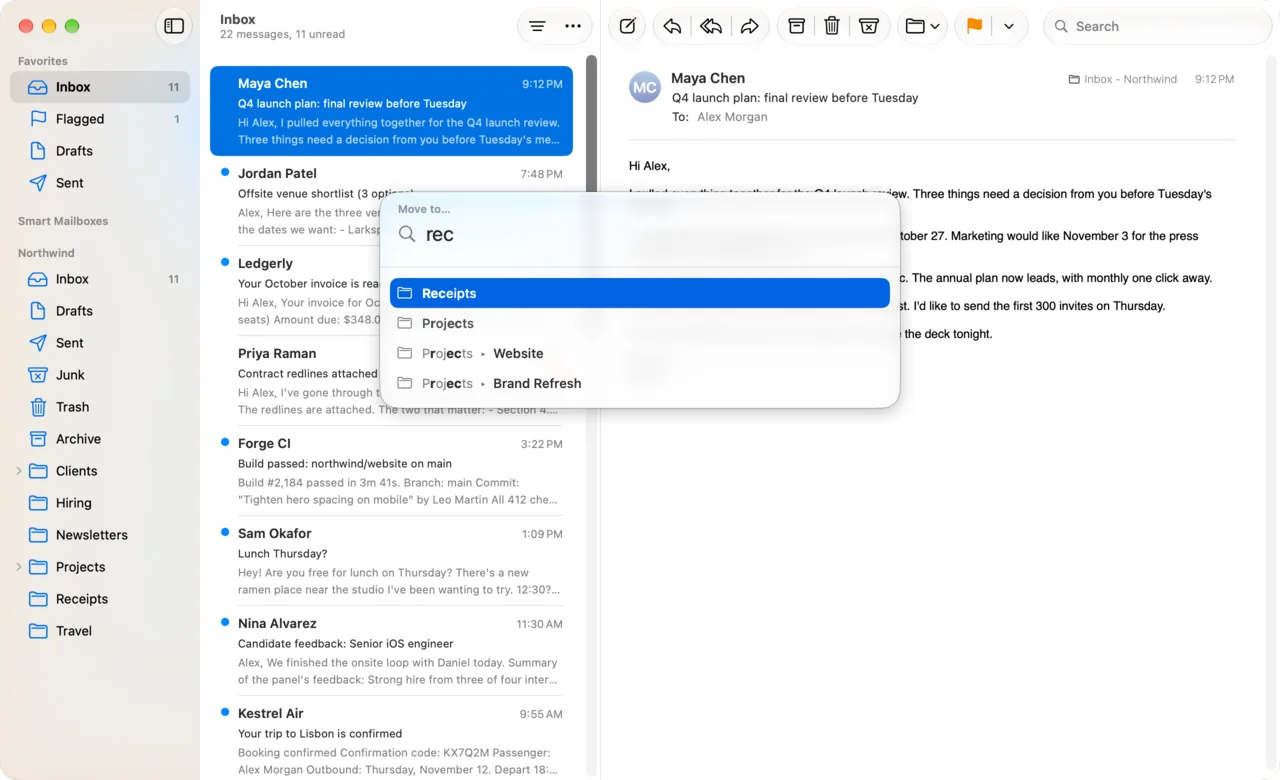
DuperMail files Apple Mail messages from the keyboard the way MsgFiler users like it. Press v, type a few letters, press Return. It works inside Mail's own window, and it brings snooze, Send & Archive, snippets and Gmail's shortcuts along.
Free for 14 days. For macOS 26 or later.
Keyboard filing for Apple Mail, done properly.
Out of the box, Apple Mail files by drag and drop, the Move To menu, or a shortcut for the first nine Favorites. DuperMail gives you a key for every mailbox.
- vMove to any mailbox
- Press v, type a few letters of the mailbox name and press Return. It searches every mailbox on every account in Mail, so a folder three levels down takes as long to reach as the Inbox.
- lCopy, or label on Gmail
- l copies the messages into another mailbox and leaves them where they are. On a Gmail account that's adding a label, the way l works in Gmail.
- 123Quick Filing: one key per mailbox
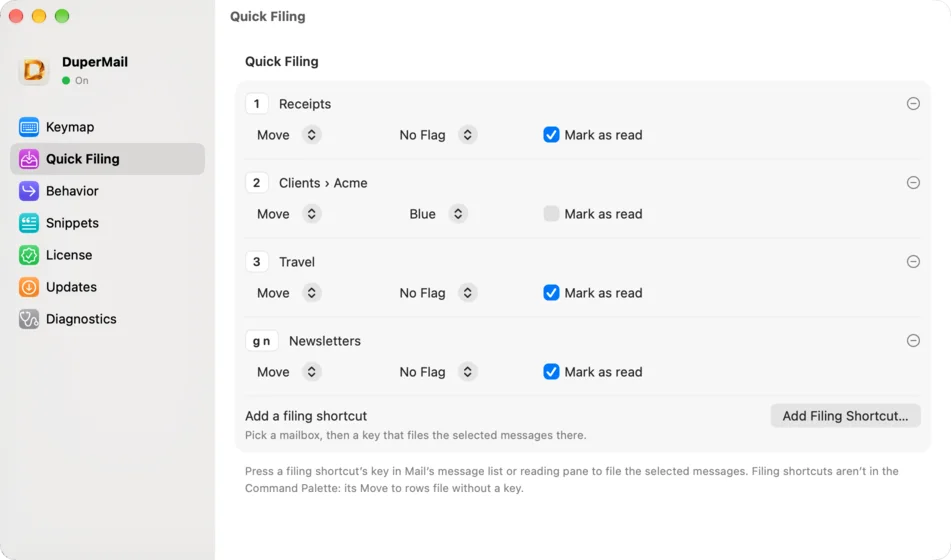
- Give the mailboxes you file to every day their own key. One press moves or copies the selection there, and can flag it or mark it as read on the way.
- xFile a batch at once
- x selects messages as you move down the list, Gmail-style. Select ten receipts, press 1, and all ten are filed.
- zUndo the whole thing
- Filed to the wrong place? z puts everything back, including the flag and read state Quick Filing changed.
- glGo to a mailbox by name
- g l opens any mailbox by typing its name, so you can check what's in Receipts without reaching for the sidebar.
Your favorite mailboxes, one key each.
MsgFiler users file to the same handful of mailboxes all day. Quick Filing makes that a single key. 1 can move to Receipts and mark it read, 2 can copy to a client's mailbox with a blue flag. Any key works, even a two-key sequence like gn.
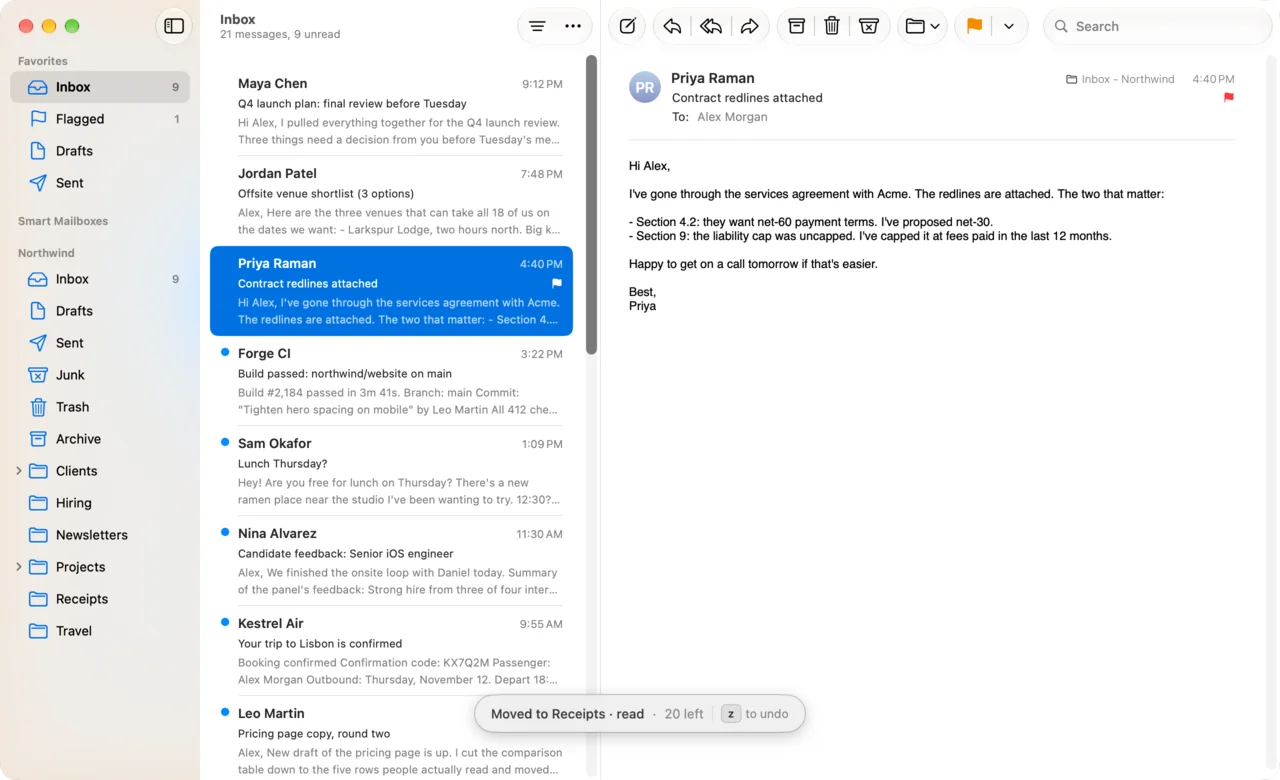
A short message confirms where the mail went and how many are left in the inbox. Press ? and your filing keys are listed with the rest.
Filing is where it starts.
MsgFiler only files. DuperMail adds the tools people usually leave Apple Mail for, all from the keyboard.
- b
Snooze
Type "tomorrow 9am" or "2h". The message leaves the inbox and comes back through Mail's Remind Me.
- ⌘⇧↩
Send & Archive
Send the reply and archive the message you answered in one shortcut.
- ⌘U
Unsubscribe & Block
Unsubscribe, block the sender in Mail and archive all their mail. z brings it back.
- ⇧L
Reply Later
Set a message aside to answer later. g r shows the pile.
- ⌘;
Snippets
Drop in replies you type every week, with the recipient's first name and the date filled in.
- ⌘K
Command palette
Run any action or open any mailbox by name, no keys to remember.
- jke
Gmail's shortcuts
j, k, e, r, # and the rest, or Superhuman's set. Rebind any key.
- ⌘K
Links to messages
Copy a link from the palette into your notes or tasks. Clicking it opens that message in Mail.
DuperMail vs MsgFiler
Both file Apple Mail messages from the keyboard. Here's where they differ.
| Feature | DuperMail | MsgFiler 4 |
|---|---|---|
| Move or copy by typing a mailbox name | Yes, v and l | Yes |
| Favorite mailboxes on their own keys | Yes, Quick Filing, on any key you choose | Yes, favorites on numbered keys |
| Where you work | Inside Mail's own window | In MsgFiler's window, docked beside Mail |
| Moving Gmail messages out of the Inbox | Uses Mail's own Move To. Nothing else to install | Needs the MsgFiler Filing Script installed |
| Gmail keyboard shortcuts in Mail (j, k, e, r…) | Yes, or Superhuman's | No |
| Snooze | Yes, in plain words | No |
| Send & Archive | Yes | No |
| Unsubscribe & Block | Yes | No |
| Snippets | Yes | No |
| Command palette | Yes, ⌘K | No |
| Settings synced over iCloud | Yes, keys, filing shortcuts and snippets | Favorites |
| Free to try | Everything, free for 14 days | Free tier; moving and copying are limited |
| Runs on | macOS 26 or later | macOS 13.5 or later |
MsgFiler details come from its Mac App Store listing and its developer's notes, as of October 2026. MsgFiler is a trademark of its owner; DuperMail isn't affiliated with it.
Coming from Mail Act-On or a Mail plug-in?
Mail Act-On, the old MsgFiler plug-in and other Mail bundles stopped working when Apple removed plug-in support in macOS Sonoma. Keyboard Maestro macros and AppleScripts filled the gap for some people, but they break when Mail's menus change.
DuperMail isn't a plug-in. It uses Mail's own commands, and after every macOS or Mail update it checks that each one is still there. If something changed, it turns off only the affected shortcuts and tells you which.
When MsgFiler may suit you better
- Your Mac runs a macOS version earlier than 26. DuperMail needs macOS 26 or later.
- You want suggestions for where to file each message, learned from your filing history. MsgFiler's Smart Suggestions do that.
- You only need to flag and label messages, and MsgFiler's free tier covers it.
Switch from MsgFiler in five minutes
- Download DuperMail and open it. Setup moves it to Applications and asks for Accessibility, the one permission it needs.
- Open Settings, choose Quick Filing, and give the mailboxes you had as MsgFiler favorites their own keys.
- In Mail, select a message and press v to file it anywhere else.
- Quit MsgFiler and take it out of your Login Items.
Questions from MsgFiler users
Is DuperMail a good MsgFiler alternative?
If you file mail from the keyboard, yes. v moves and l copies to any mailbox you find by typing a few letters, and Quick Filing gives your everyday mailboxes their own key. On top of filing, DuperMail adds snooze, Send & Archive, Unsubscribe & Block, snippets, a command palette and Gmail's keyboard shortcuts to Apple Mail.
How do I move an email to a folder in Apple Mail with a keyboard shortcut?
With DuperMail, select the message and press v, type part of the folder's name and press Return. For folders you use every day, set a Quick Filing key in Settings and one press files the message. Without an add-on, Mail only offers Control-Command-number for mailboxes on the Favorites bar.
Is DuperMail a Mail plug-in?
No. Apple stopped loading Mail plug-ins in macOS Sonoma, which is what broke Mail Act-On and the old MsgFiler plug-in. DuperMail is a regular Mac app. With the Accessibility permission you give it during setup, it uses Mail's own menu commands, so it keeps working through Mail updates and checks itself after each one.
Does filing work with Gmail labels?
Yes. v moves a message out of the Inbox into the mailbox you pick, and l copies it, which on Gmail adds a label and leaves it in the Inbox. g a goes to All Mail. It works the same on iCloud, Outlook, Exchange and any IMAP account you have in Mail.
Can I undo a filing mistake?
Press z. It undoes the last action, including a Quick Filing that moved, flagged and marked messages as read in one go.
How much does DuperMail cost?
It's free for 14 days, with every feature included and no card needed. Then it's $4 a month, $36 a year or $59 once. One license covers up to 3 Macs.
Will my Mail rules, accounts and smart mailboxes keep working?
Yes. DuperMail doesn't replace Mail or sync your mail anywhere. It presses Mail's own commands, so rules, signatures, smart mailboxes and iCloud all work as before.

File faster in Apple Mail. Then do the rest.
Free for 14 days. No account, no card.
Download DuperMailFor macOS 26 or later. See pricing