ReplyCube alternative
A ReplyCube alternative that does a lot more than snippets.
DuperMail puts your canned responses behind one shortcut in Apple Mail and fills in the recipient's name for you. It also brings snooze, Send & Archive, Reply Later, Unsubscribe & Block and Gmail's keyboard shortcuts to Mail.
Free for 14 days. For macOS 26 or later.
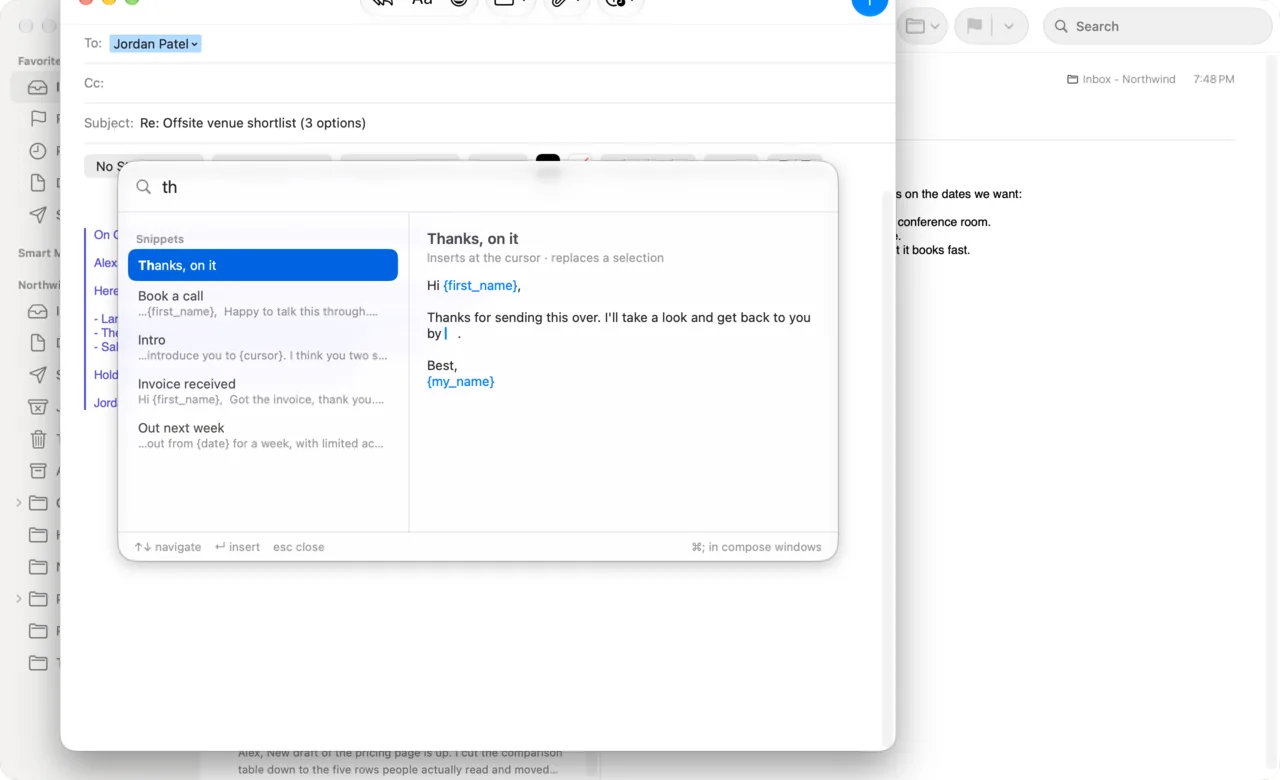
Canned responses in Apple Mail, at ⌘;
Write a reply once. Then, in any message you're writing, press ⌘;, type a few letters of its name and press Return.
- One shortcut, from any field
- Press ⌘; with the cursor in To, Cc, Subject or the message itself. The snippet always lands in the body. There's no toolbar button to find. You can change the key.
- Find it by name
- Type a few letters and the list narrows as you go. The preview shows exactly what goes in before you press Return.
- Fills in names and dates
{first_name}becomes the first name of the person you're writing to,{my_name}your name, and{date}today's date.- Leaves the cursor where you'll type
- Put
{cursor}in a snippet and the caret lands there, ready for the part that changes every time. - Fills in an empty subject
- Give a snippet a subject and DuperMail adds it when the message has none. A reply keeps its own.
- Leaves your clipboard alone
- Snippets go straight into the message without copy and paste, so whatever you copied stays copied. ⌘Z takes the snippet back out.
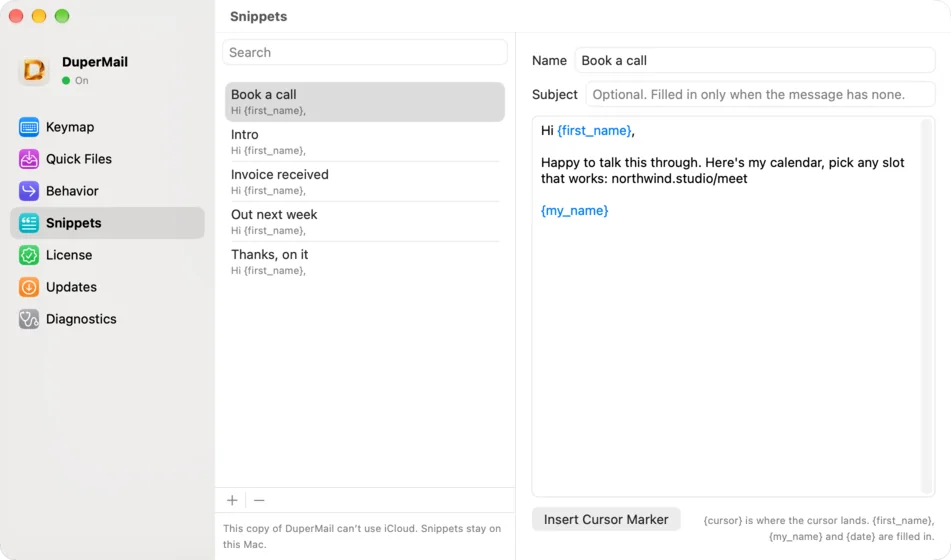
Write them once, use them on every Mac.
Snippets live in DuperMail's Settings: a name, an optional subject, and the text. Turn on iCloud Sync and the same snippets, keys and filing shortcuts follow you to every Mac you use.
DuperMail vs ReplyCube
Both put saved replies inside Apple Mail. They differ in how you insert a reply, and in what else comes with it.
What it is
- DuperMail
- Snippets, keyboard shortcuts, snooze, filing and more, added to Apple Mail
- ReplyCube
- An app and Mail extension for canned messages
Insert a saved reply
- DuperMail
- ⌘;, type a few letters, Return
- ReplyCube
- Click its icon in the compose toolbar, then copy and paste or drag a reply in
Recipient's first name, your name, today's date
- DuperMail
- Filled in for you
- ReplyCube
- Not listed
Choose where the cursor lands
- DuperMail
- Yes, with {cursor}
- ReplyCube
- Not listed
Fill in the subject
- DuperMail
- Yes, when the message has none
- ReplyCube
- Not listed
Formatting, images and attachments
- DuperMail
- Plain text only
- ReplyCube
- Bold, lists, images and files
Sync
- DuperMail
- iCloud, across your Macs
- ReplyCube
- iCloud, across iPhone, iPad and Mac
iPhone and iPad
- DuperMail
- No, Mac only
- ReplyCube
- Yes, with a keyboard extension
AI writing
- DuperMail
- None. Nothing about your mail leaves your Mac
- ReplyCube
- Optional, through OpenAI
Keyboard shortcuts for the whole inbox
- DuperMail
- Gmail's or Superhuman's, and you can change any key
- ReplyCube
- No
Snooze, Send & Archive, Reply Later, Unsubscribe & Block
- DuperMail
- Included
- ReplyCube
- No
Command palette
- DuperMail
- ⌘K runs anything by name
- ReplyCube
- No
Runs on
- DuperMail
- macOS 26 or later
- ReplyCube
- macOS 12 or later
Free trial
- DuperMail
- 14 days
- ReplyCube
- 7 days
Price
- DuperMail
- $4 a month, $36 a year, $59 once
- ReplyCube
- $1.49 a month or $9.99 a year
 DuperMail
ReplyCube details come from its App Store listing and published reviews, checked in October 2026. “Not listed” means we couldn't find it there. Spotted something out of date? Write to [email protected] and we'll fix it.
Then it handles the rest of your inbox.
Archive, move, snooze, unsubscribe: in Mail, each one is a trip to the toolbar or a menu. DuperMail gives each its own key, on every account you have in Mail.
- ⌘⇧↩
Send & Archive
Send your reply and archive the message you answered in one go. Make it ⌘Return if that's what Gmail taught you.
- b
Snooze
Hide a message until later. Type “tomorrow 9am”, “tuesday” or “2h”. It comes back through Mail's own Remind Me.
- ⇧L
Reply Later
Set aside the messages you need to answer, and see the whole pile with g r when you sit down to write.
- ⌘U
Unsubscribe & Block
Unsubscribe from a list, block the sender and archive all their mail. One z brings it back.
- v
Move, copy and Quick Filing
File by typing a few letters of a mailbox, or give your busiest mailboxes their own key.
- jke
Gmail's keyboard shortcuts
j and k to move, e to archive, r to reply, g i for the inbox. If Gmail taught you the keys, they work here.
- ⌘K
Command palette
Search every command and mailbox by name, and see its key for next time.
- ?
Every key, on demand
Press ? in Mail to see every shortcut, your own filing keys included.
When ReplyCube is the better pick
ReplyCube is the better buy if:
- You need your canned replies on iPhone or iPad. DuperMail runs on the Mac only.
- Your templates need formatting, images or attachments. DuperMail's snippets are plain text.
- Your Mac runs a version of macOS older than 26.
- Templates are all you want from Mail. ReplyCube costs less.
Switching from ReplyCube
- Download DuperMail and open it. A short setup moves it to Applications and asks for the one permission it needs.
- Open DuperMail's Settings, choose Snippets, and press +.
- Paste in each ReplyCube reply. Swap names for
{first_name}, and add{cursor}where you usually start typing. - Using more than one Mac? Turn on iCloud Sync.
- Turn ReplyCube off in Mail's Settings, under Extensions.
Fourteen days free. Then from $3 a month.
No card to start. If you buy and change your mind, ask within 14 days for a full refund.
Monthly
$4per month
Cancel any time.
Yearly
$36per year
$3 a month, billed once a year.
Lifetime
Save $20$39
$59onceWorks forever, with a year of updates. $39 until November 11, then $59.
Get Lifetime for $39Ends in 30d 07h 00m 49s
$59once
Works forever, with a year of updates. Another year is $29.
- One license covers up to 3 Macs.
- After the trial, it keeps working with a reminder.
- Polar handles payment. Change or cancel any time.
Questions, answered.
Does Apple Mail have canned responses or email templates?
Not ones you can drop into a message you're writing. Mail has signatures, but no library of saved replies. You need an add-on for that, such as DuperMail or ReplyCube.
Is there a keyboard shortcut to insert a template in Apple Mail?
With DuperMail, yes: press ⌘; in any message you're writing, type a few letters of the snippet's name and press Return. You can move it to another key in Settings.
Can an Apple Mail template fill in the recipient's name?
DuperMail's can. Write {first_name} in a snippet and it becomes the first name of the first person in To. {my_name} and {date} work the same way. If there's no name to fill in, the cursor waits there so you can type it.
Can I import my ReplyCube templates?
There's no importer. Open DuperMail's Settings, choose Snippets, and paste each reply into a new snippet. It's a good moment to swap names for {first_name}.
Do DuperMail snippets work on iPhone or iPad?
No. DuperMail runs in Apple Mail on the Mac, with macOS 26 or later. iCloud Sync keeps your snippets the same on every Mac you use.
Can snippets include formatting, images or attachments?
No, snippets are plain text. Quotes and dashes follow Mail's Smart Quotes and Smart Dashes settings, so a snippet reads as if you'd typed it.
How much does DuperMail cost?
It's free for 14 days, then $4 a month, $36 a year, $59 once. One license covers up to 3 Macs.
Do my snippets leave my Mac?
Only through your own iCloud account, if you turn on iCloud Sync. DuperMail never logs your snippets or what you type, and it has no analytics.

Try it with your own canned replies.
Paste in the three you send most and use them for a week.
Download DuperMailFor macOS 26 or later.